Blog, Technical Articles

What is an RF cable on a smart TV?

What is an RF cable on a smart TV

If you’re asking, “What is an RF cable on a smart TV?” you’re in the right place. An RF cable, short for Radio Frequency cable, is a vital tool for connecting your smart TV to an antenna or cable service, delivering broadcast channels to your screen. This article breaks down the role of RF cables, analyzes their use with smart TVs, and offers solutions for businesses seeking reliable connections—whether through a coaxial RF cable or custom RF cable assemblies.

What is an RF Cable?

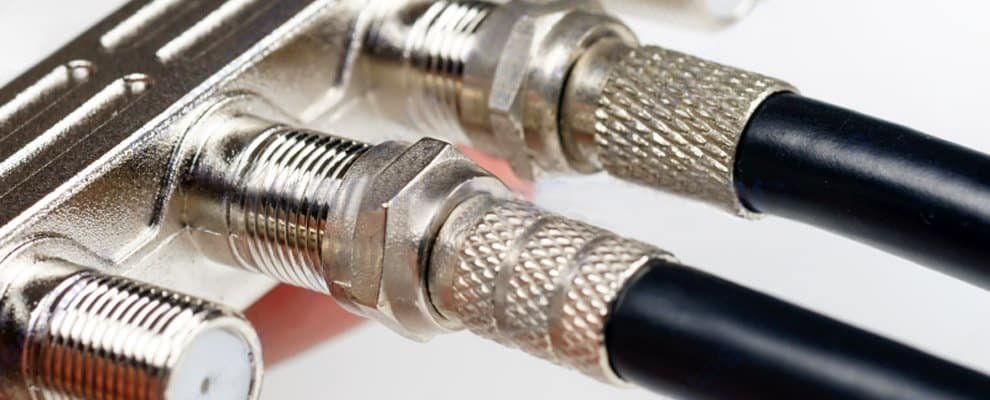
An rf to tv cable is a precision engineered coaxial RF assembly built to transmit high fidelity radio frequency signals with minimal loss. Using a solid center conductor and multilayer shielding, this rf to tv design suppresses external noise and preserves impedance for reliable reception. It is engineered to connect the coaxial cable quickly and securely, reducing installation complexity and ensuring stable performance in broadcast, hospitality, and large AV projects. As a vertically integrated manufacturer and trading partner serving enterprise customers, we provide ruggedized terminations, tailored lengths, and rigorous quality testing. Our full spectrum services from extrusion through assembly cut procurement time, improve grounding, reduce lifecycle costs, ensure code compliance, and facilitate fast replacements. The 50 ohm rf cable and diverse rf cable connectors types offer enhanced compatibility, minimize signal degradation, and support seamless integration across various systems and environments for consistent operation.

Unlike HDMI cables (for digital video) or optical cables (for audio), RF cables handle both analog and digital signals for TV broadcasts. For users, understanding this distinction is key when sourcing RF cable assemblies for large-scale setups.

Why Use an RF Cable with a Smart TV?

Smart TVs come with an RF input—often labeled “ANT/CABLE IN”—but why is it needed? The problem is simple: while streaming dominates, many businesses still rely on broadcast or cable channels for live content, like news or sports. An RF cable for TV solves this by linking the TV to an RF cable antenna or cable service.

However, signal quality can vary. Factors like cable length or poor shielding can weaken performance, a challenge businesses must address when equipping multiple TVs.

How Does an RF Cable Work on a Smart TV?

Connecting to an Antenna or Cable

The RF cable connects your smart TV to an external source:

  • Antenna: An RF cable antenna setup delivers free over-the-air channels.
  • Cable Service: It links to a cable outlet for subscription channels.

Signal Transmission

The cable carries radio frequency signals to the TV’s tuner, which decodes them into audio and video. For businesses, using high-quality RF coax cables ensures consistent signal strength across multiple units.

Solving the Challenge: Choosing and Using RF Cables

Selecting the Right RF Cable

For optimal performance, consider these options:

  • Standard Coaxial RF Cables: Affordable and effective for small setups.
  • Custom RF Cable Assemblies: Tailored for businesses needing specific lengths or connectors, ideal for hotels or offices.

Look for:

  • Shielding: Reduces interference.
  • Length: Shorter cables minimize signal loss.
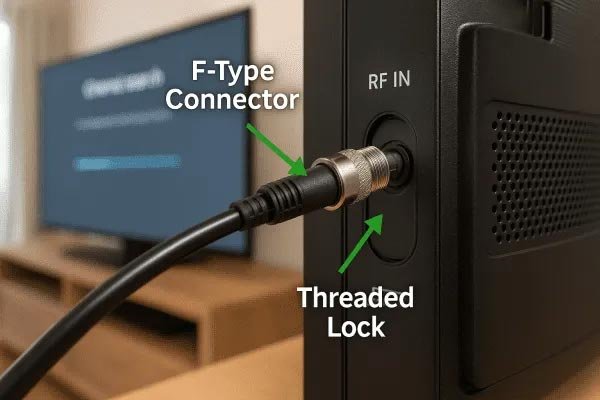
  • Connectors: Match your TV’s RF input (e.g., F-type connectors).
Common-Use-Cases-for-RF-Cable-on-TVs

Connecting an RF Cable to a Smart TV

  1. Find the “ANT/CABLE IN” port on your TV.
  2. Attach one end of the RF cable to the port.
  3. Connect the other end to your antenna or cable outlet.
  4. Scan for channels via the TV menu.

Troubleshooting Common Issues

  • Weak Signal: Use a shorter RF coax cable or reposition the antenna.
  • No Picture: Ensure secure connections and correct input settings.
  • Interference: Upgrade to custom RF cable assemblies with better shielding.

Why Businesses Should Care About RF Cables

For installers, integrators, and facility managers, reliable RF cable assemblies ensure essential performance and scalability in commercial and residential deployments. Custom-engineered solutions streamline complex installations while maintaining uniform signal distribution across multiple displays, particularly where televisions require reliable rf input on tv connectivity through their rf coaxial input or rf jack on tv interfaces. These integrated rf cable to tv systems simplify signal transmission through precision manufacturing that enhances grounding effectiveness and improves impedance matching for stable coaxial rf input performance. The assemblies effectively address signal degradation and connection instability challenges while supporting various rf adaptor configurations, ensuring secure connection to the rf plug on tv and compatibility with rg58 rf cable and other rf cable connector types. This comprehensive approach reduces troubleshooting needs and minimizes installation time, creating optimized broadcast, monitoring and entertainment networks with lower maintenance requirements. Our production process focuses on durable construction that withstands frequent reconnections while maintaining stable signal integrity across all connected displays, solving common issues like signal loss and intermittent connections in multi-television installations.

rf-antenna-input-tv

Conclusion

Understanding the role of an rf cable for a tv is crucial for maintaining consistent signal quality in various applications. An rf coaxial cable efficiently carries broadcast signals with advanced shielding to minimize interference, providing stable connectivity from residential setups using an rf cable for smart tv to complex enterprise-grade video walls. While standard rf coax handles basic installations, commercial projects frequently require custom assemblies, specialized rf cable extension for long-distance runs, and a dependable rf connector for tv manufacturer to guarantee end-to-end system integrity and seamless rf antenna input integration. Choosing the appropriate rf coax enhances picture clarity, reduces operational downtime, and streamlines installation while improving grounding and impedance control for superior performance. Professional video systems depend on tailored rf coaxial cable solutions to accelerate deployment, cut lifecycle expenses, and deliver scalable, code-compliant operations. These robust connectivity options also address common issues like signal degradation and environmental stressors by resisting corrosion and preserving stable electrical properties, ultimately supporting reliable data transmission and reducing maintenance needs across diverse conditions.

FAQ

1.How to connect rf cable to tv?

I connect the RF cable to the TV by twisting it onto the ANT IN port securely to get a stable signal.

2.How does an rf cable connect to a tv?

I connect the RF cable to the TV by screwing it onto the ANT IN port securely for a stable signal and clear reception.

3.What is the rf cable on a tv?

I see the RF cable on a TV as the wire that hooks up an antenna to catch broadcast signals for TV.

4.What type of coaxial cable does one use to plug in a tv?

I use an RG-6 coaxial cable to plug in a TV, ensuring reliable signal reception for broadcasts.

5.How to properly connect a coaxial cable to a tv?

I properly connected the coaxial cable to the TV by hand-tightening the connector for optimal signal quality.

6.What does an rf coaxial cable look like?

I see an RF coaxial cable as a thick, insulated wire with a screw-on connector for stable TV hookups.

7.What cable to use for tv antenna?

For connecting a TV antenna, I use a coaxial cable to ensure a strong and clear signal reception.

8.What is RF connection on TV?

An RF connection on your TV uses an rf connector for tv to link an antenna or cable via coaxial cable, receiving broadcast signals for channel access.

9.What is the purpose of the RF connector?

An RF connector lets you join devices that send or receive radio signals, helping keep the signal strong in lab settings.

10.How to use RF adapter on smart TV?

To use an RF adapter on your smart TV, plug it into the ANT IN port, then search for TV channels in the menu.

11.What is RF input on a TV?

Your TV’s RF input is the port where you connect an antenna or cable to receive broadcast signals on an RF television.

12.Are RF and coaxial the same?

You’ll find RF and coaxial are not identical; RF refers to the signal, while coaxial is the cable that carries it.

13.How to connect RF cable to modern TV?

To connect an RF cable to your modern TV, locate the RF input, screw the cable connector in firmly, and perform a channel scan in settings.

14.What does an RF cable look like on a TV?

You’ll recognise an RF cable on your TV by its single round connector with a threaded metal collar that screws onto the port.

Leave a Reply

Your email address will not be published. Required fields are marked *